
OpenFOAM 14 Case Structure Explained with damBreakLaminar
Every OpenFOAM simulation is organised around a case directory. Once you
understand that directory, the software becomes much easier to read:
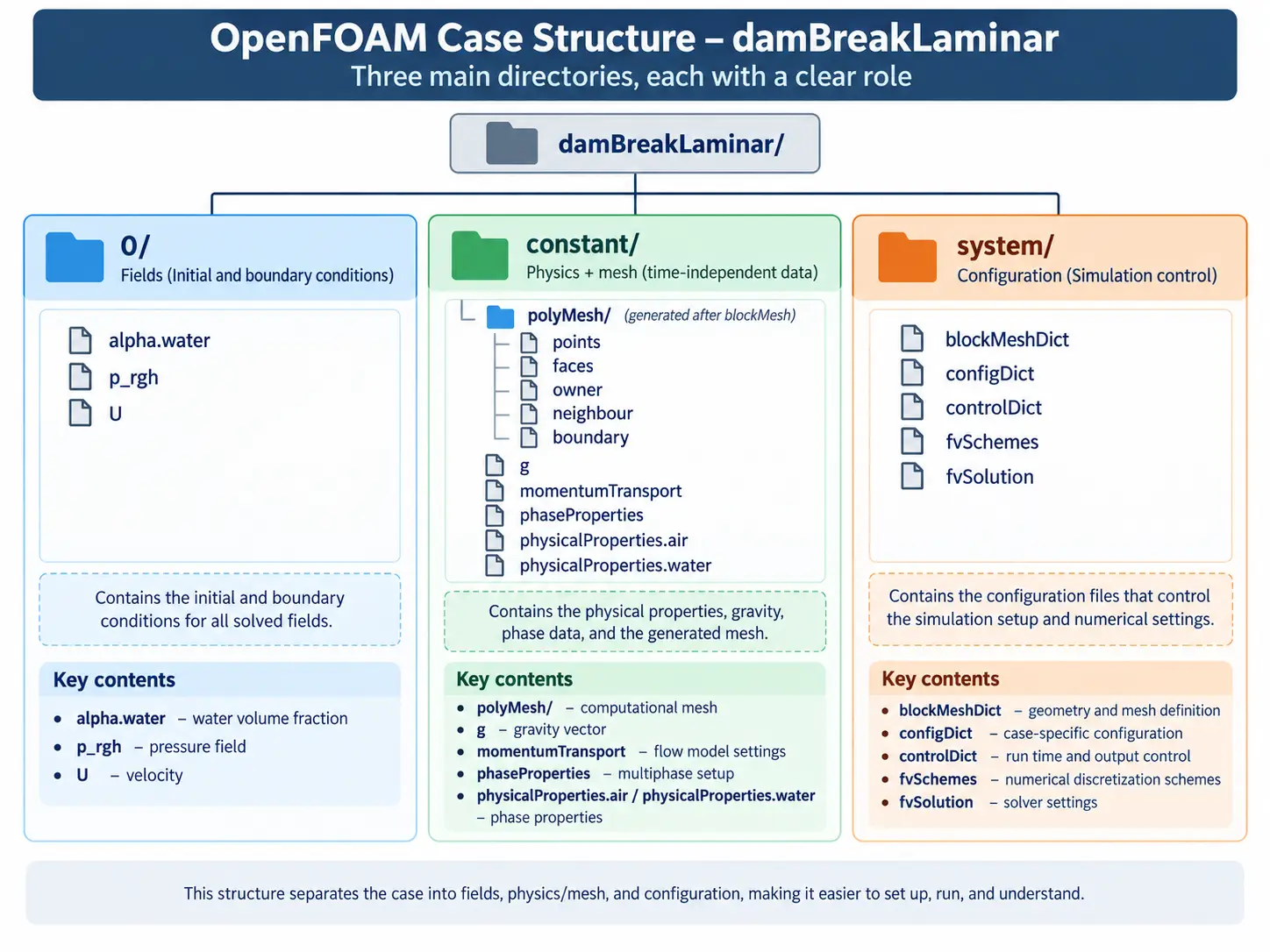
0 contains field data, constant contains
time-independent physics and mesh data, and system contains
the configuration that controls how the case is prepared and run. This
article explains that OpenFOAM case structure using a real
OpenFOAM damBreakLaminar example from OpenFOAM Foundation 14
rather than an abstract folder tree.
We will inspect the actual field files, physical properties, mesh
definition, generated polyMesh database, and the principal
files in system. Then we will run the case with
blockMesh, checkMesh, and foamRun
so you can see how the original three-directory structure develops into
a solved transient case with additional time directories.
The purpose is structural rather than a deep VOF lesson. The
alpha.water field appears because it is part of the real
dam-break case, but interface-compression settings, MULES internals, and
the detailed VOF equation are intentionally left for a dedicated
multiphase-flow article. Likewise, controlDict,
fvSchemes, and fvSolution are introduced by
role here rather than analysed entry by entry.
If you need the software first, use
How to Install OpenFOAM 14 and v2606 on Ubuntu 24.04
.
In our previous article,
OpenFOAM 14 Tutorial: Run Your First Simulation with pitzDailySteady
,
we covered the simpler end-to-end workflow of opening a case, generating
a mesh, running foamRun, and checking the result. This article
builds on that foundation by focusing on how the case itself is organised.
You can also browse the wider
OceanTechReview projects and tutorial index
or visit
Software & Workflow Notes
for additional software-focused guides. For the differences between the
two major OpenFOAM distributions used in this series, see
OpenFOAM 14 vs v2606 for Marine CFD
.
1. OpenFOAM Case Structure at a Glance
An OpenFOAM case is a directory that contains everything required to
describe, configure, run, and store a CFD simulation. The most important
structural idea is that the case begins with three core directories:
0, constant, and system.
They are not arbitrary names. OpenFOAM applications expect these
locations and read different types of data from each one. The
OpenFOAM v14 User Guide section on case file structure
documents the same directory hierarchy and the roles of time,
constant, and system data.
A useful mental model is:
0 answers “what are the starting fields and boundary
conditions?”, constant answers “what physical problem and
mesh are we solving?”, and system answers “how should the
case be configured and executed?”
0/ → initial and boundary field data
constant/ → physical properties and models
system/ → mesh, numerics, and run configuration
blockMesh → generates constant/polyMesh
checkMesh → validates the generated mesh
foamRun → advances the transient solution
Keep the distinction clear: the original case
definition and the generated simulation data live in the same case
directory, but they are not the same thing. In particular,
system/blockMeshDict is a mesh definition, while
constant/polyMesh is the mesh database generated from it.
2. Open the damBreakLaminar Case
The example used here is the Foundation 14
damBreakLaminar tutorial under
$FOAM_TUTORIALS/incompressibleVoF/damBreakLaminar. Work from
a writable user copy rather than modifying the installation directory.
In the OceanTechReview setup, the copied tutorials are stored beneath:
~/OpenFOAM/<username>-14/run/tutorials
Open a fresh terminal in the copied
incompressibleVoF/damBreakLaminar directory and activate
OpenFOAM Foundation 14:
of14
In this series, of14 is a helper shell function created in
the installation guide that sources
/opt/openfoam14/etc/bashrc into the current terminal. It is
not a stock OpenFOAM command. Because the helper changes the current
shell environment, use a fresh terminal when switching between different
OpenFOAM distributions.
Verify the active installation and inspect the case:
          echo $WM_PROJECT_VERSION

          pwd

          find . -maxdepth 2 -type f | sort
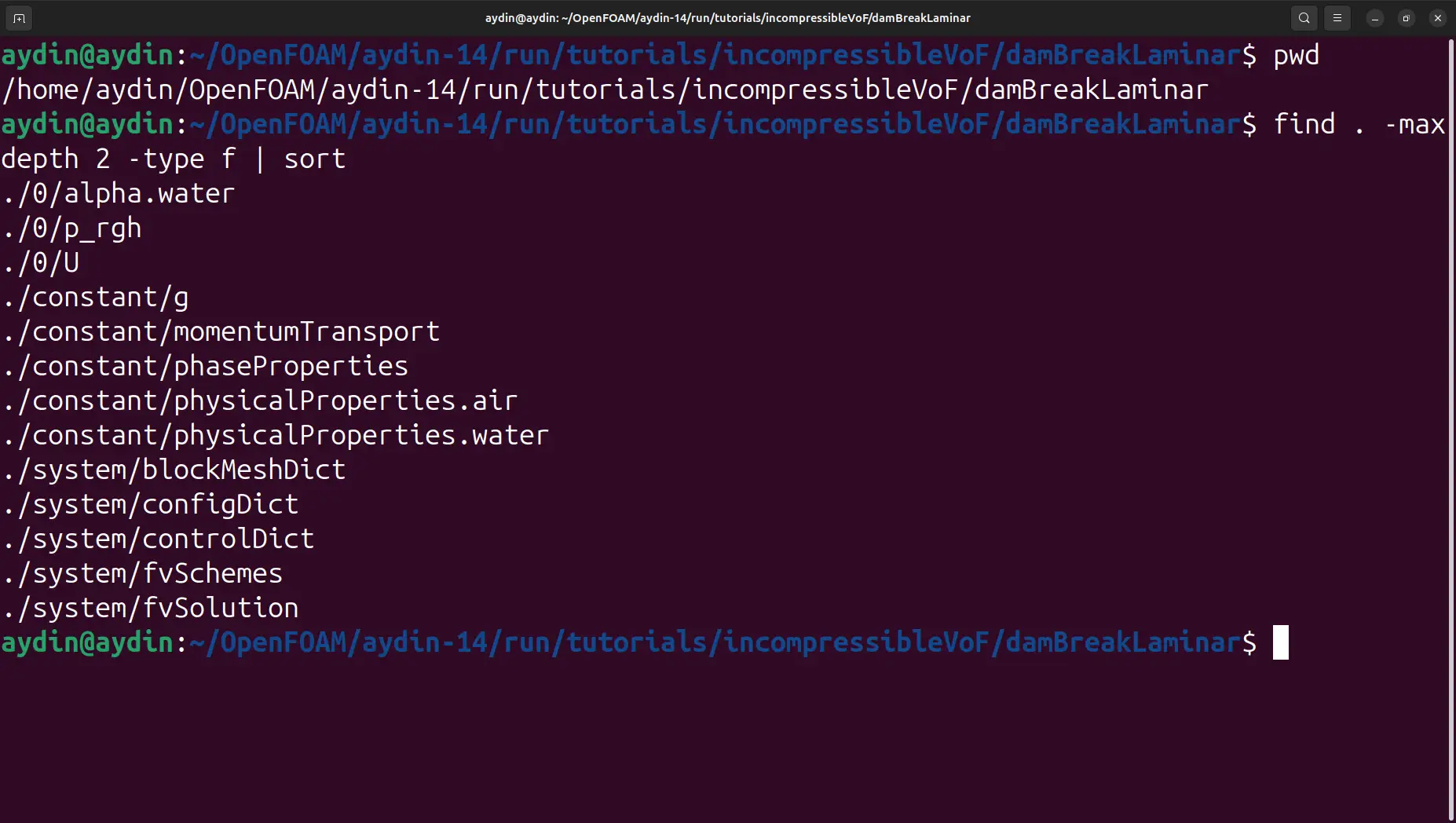
damBreakLaminar case before meshing,
showing the files stored in the core 0,
constant, and system directories.
Before the mesh is generated, the case already tells us a great deal.
The 0 directory contains alpha.water,
p_rgh, and U. The constant
directory contains gravity, phase and momentum-model data, plus separate
physical-property files for air and water. The system
directory contains blockMeshDict, configDict,
controlDict, fvSchemes, and
fvSolution.
This case has no Allrun script.
The workflow in this article is intentionally manual:
blockMesh → checkMesh →
foamRun → paraFoam.
3. The 0 Directory and OpenFOAM Field Files
The 0 directory stores the field data needed at the
beginning of the simulation. For damBreakLaminar, the three
primary files are U, p_rgh, and
alpha.water. They represent velocity, pressure with the
hydrostatic contribution removed, and the water volume fraction.
The directory name 0 is also a time name. In a transient
case it represents the initial state at simulation time zero. Later,
after the solver has advanced the calculation and written results,
additional numeric directories appear beside it.
What Is an OpenFOAM Field File?
An OpenFOAM field file describes a variable that exists over the
computational domain. The file identifies the field type, its physical
dimensions, the value assigned inside the domain at the current time,
and the boundary conditions applied at mesh patches. The actual
0/U file from this case is a compact example. For the formal
syntax and data conventions behind these files, see the
OpenFOAM v14 input/output file-format documentation.
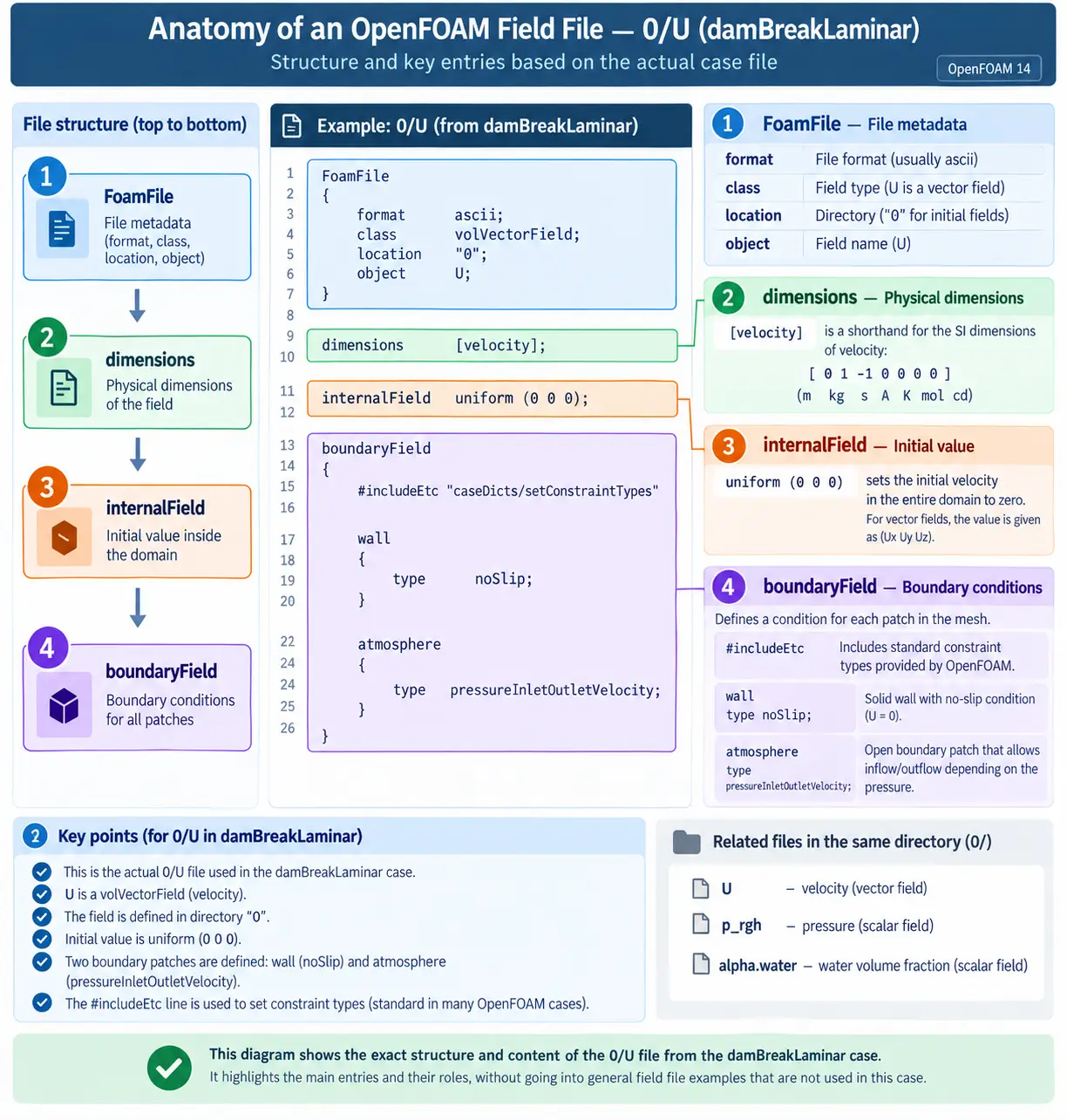
FoamFile, dimensions,
internalField, and boundaryField, illustrated
with the real 0/U file from damBreakLaminar.
The FoamFile header identifies this file as a
volVectorField named U located at time
0. The line dimensions [velocity]; gives the
physical dimensions of the field, while
internalField uniform (0 0 0); initializes the velocity
inside the domain to zero.
The boundaryField section then associates conditions with
named mesh patches. In this case, wall uses
noSlip and atmosphere uses
pressureInletOutletVelocity. You do not need to memorise
those boundary-condition classes here. The important structural point is
that field files connect physical variables to the boundary patches that
exist in the mesh.
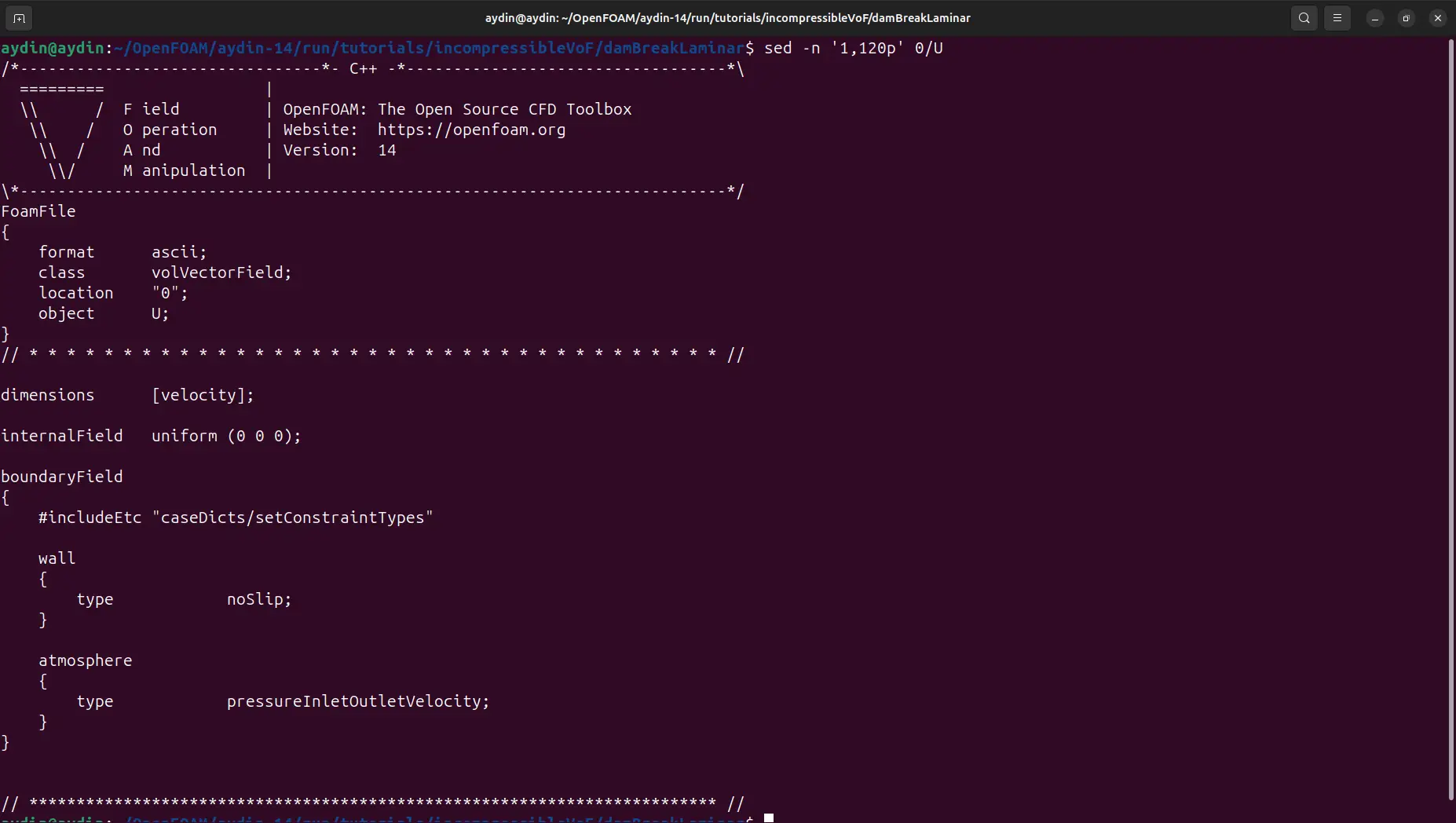
0/U file in OpenFOAM 14, showing the vector
field class, velocity dimensions, zero initial velocity, and boundary
conditions used by the dam-break case.
The same basic pattern appears in other field files even when the field
type and boundary conditions differ. For example,
alpha.water is a scalar field rather than a vector field.
That does not change the structural idea: metadata, dimensions, an
internal value, and patch-specific boundary data remain the core
components.
4. The constant Directory: Physical Properties and Models
The constant directory contains information that does not
belong to a particular output time. In this case it includes the gravity
vector, phase information, the selected momentum-transport model, and
separate physical-property files for air and water. After meshing, it
also contains the generated polyMesh directory.
The starting damBreakLaminar case contains:
Open the water-properties file and the role of
constant becomes immediately clear:
sed -n '1,120p' constant/physicalProperties.water
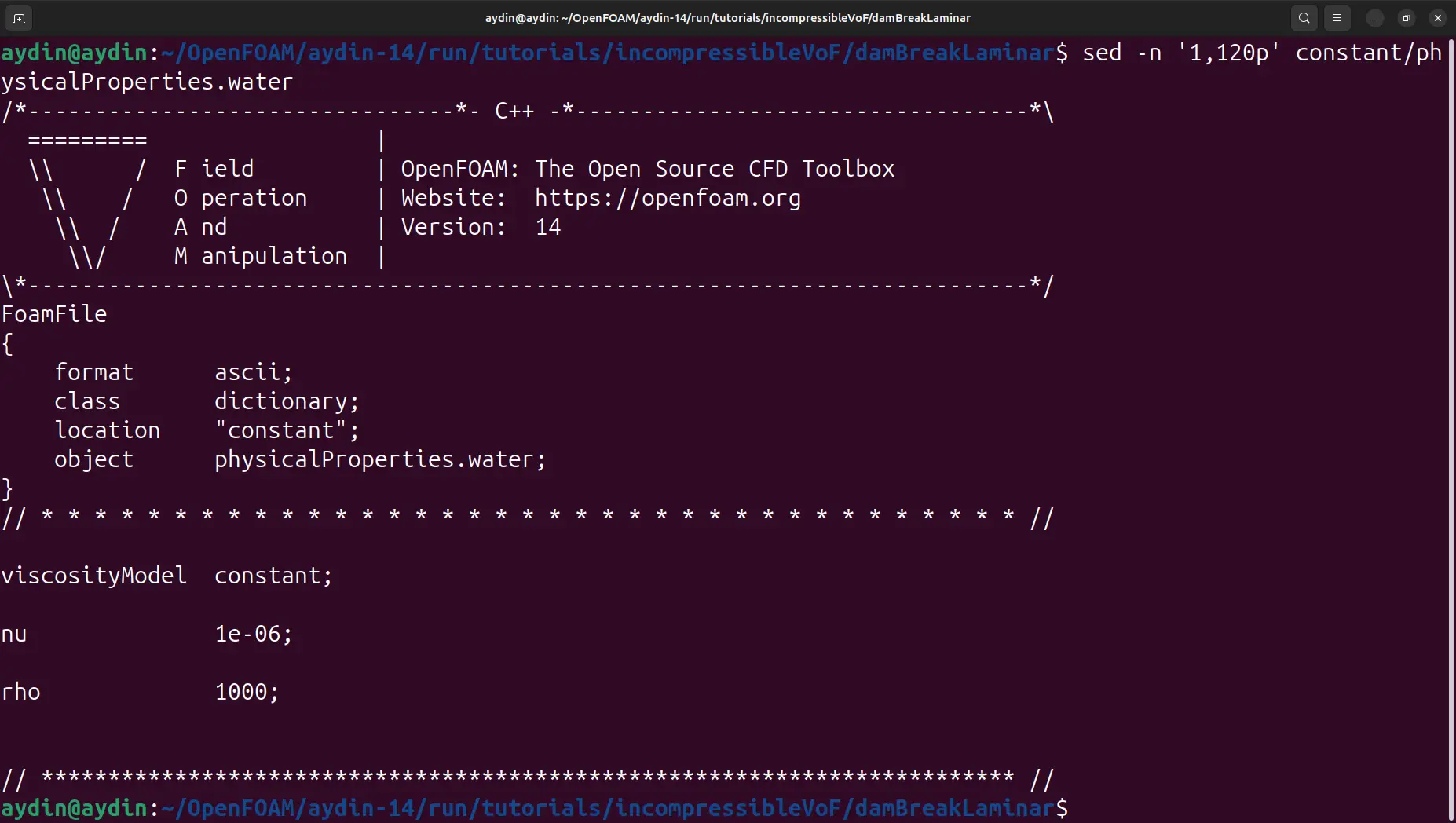
constant. The case uses
a constant viscosity model with nu = 1e-06 and
rho = 1000.
This separation matters. The initial velocity is a field value at time
zero, so it belongs under 0. Water density and viscosity
describe the physical model and do not change simply because the solver
writes a new result time, so they belong under constant.
Thinking in those terms makes unfamiliar cases much easier to navigate.
Do not read constant as “nothing can ever vary
during the physics.” It means these files are not stored as
time directories. They define time-independent case data and model
configuration, while the solution fields themselves are written in
numeric time directories.
5. Mesh Definition, polyMesh, and checkMesh
Mesh handling is one of the most important parts of OpenFOAM case
structure because the mesh definition and the generated mesh live in
different places. For this tutorial,
system/blockMeshDict is the input file read by
blockMesh. The generated finite-volume mesh is then written
under constant/polyMesh. The
official OpenFOAM v14 blockMesh documentation
describes this input-to-generated-mesh relationship in detail.
The damBreakLaminar Computational Domain
The supplied blockMeshDict uses
scale 0.146. After that scale is applied, the generated mesh
bounding box reported by OpenFOAM extends from
(0 0 0) to (0.584 0.584 0.0146) metres. The
domain is therefore 0.584 m wide, 0.584 m high, and 0.0146 m thick.
The thin third direction is treated as empty, making this effectively a
two-dimensional x–y simulation. The named physical boundaries are
leftWall, rightWall,
lowerWall, and atmosphere; the front and back
faces become defaultFaces with the empty patch type.
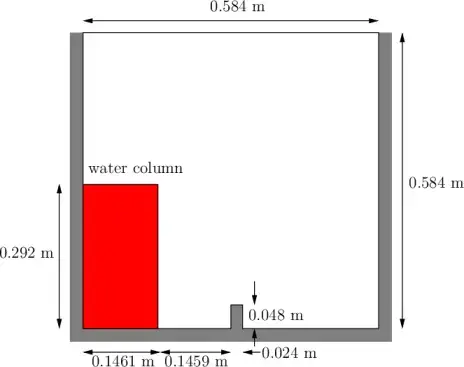
damBreakLaminar domain spans
0.584 m × 0.584 m in the x–y plane with a thickness of 0.0146 m in z.
blockMeshDict Is the Definition, Not the Mesh
The case’s blockMeshDict contains the scale, vertices,
hexahedral block definitions, the default empty patch, and the named
boundaries. Those entries describe how the mesh should be built. They
are not the face-connectivity database used directly by the solver.
Run:
blockMesh
OpenFOAM reads system/blockMeshDict, constructs the mesh,
and writes the result to constant/polyMesh. The run used in
this article generated 2,268 cells, 4,746 points, 9,176 faces, and 4,432
internal faces. All 2,268 cells are hexahedra.
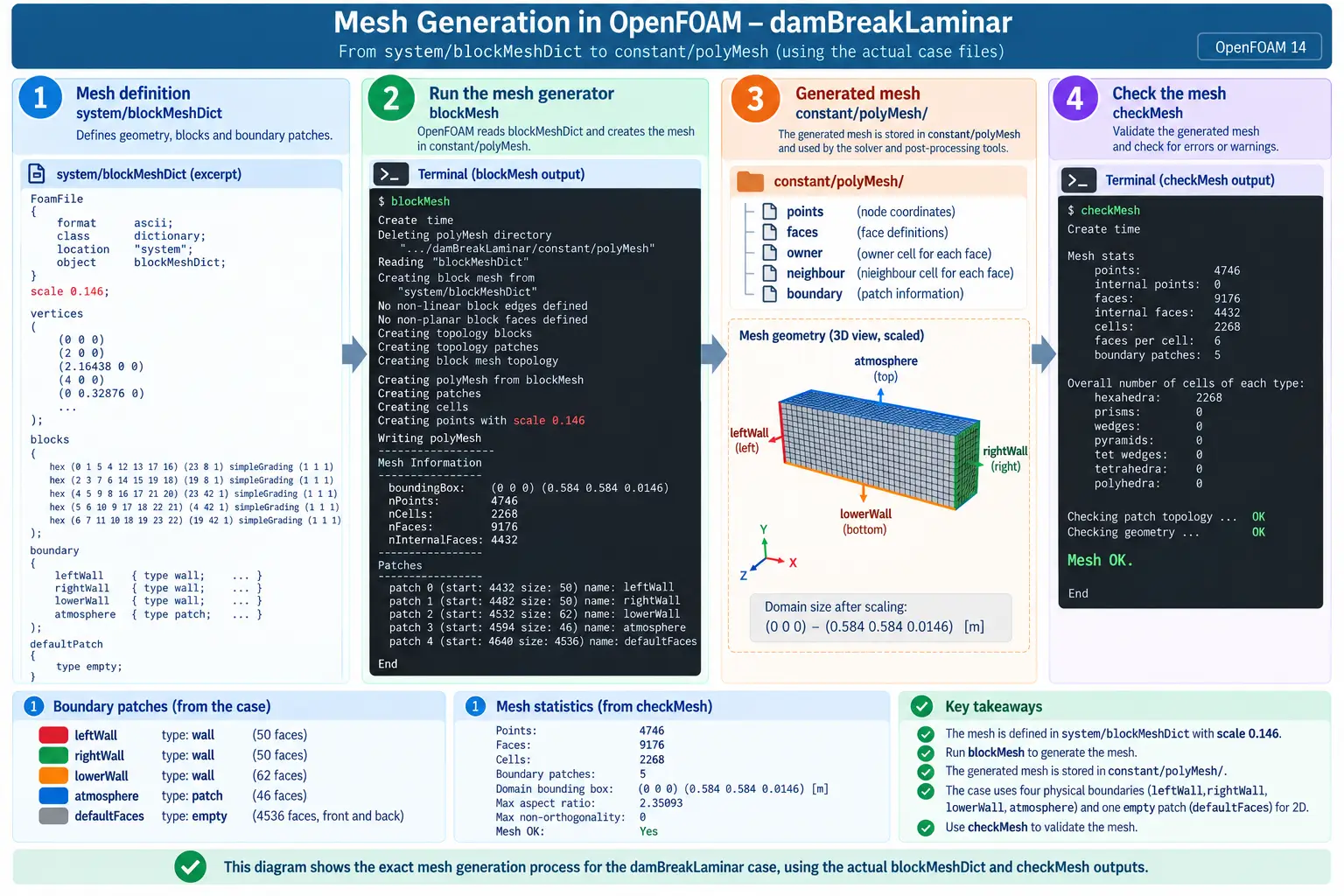
system/blockMeshDict defines the grid,
blockMesh generates it in
constant/polyMesh, and checkMesh validates
the generated mesh.
Inspect the generated mesh directory:
ls -1 constant/polyMesh
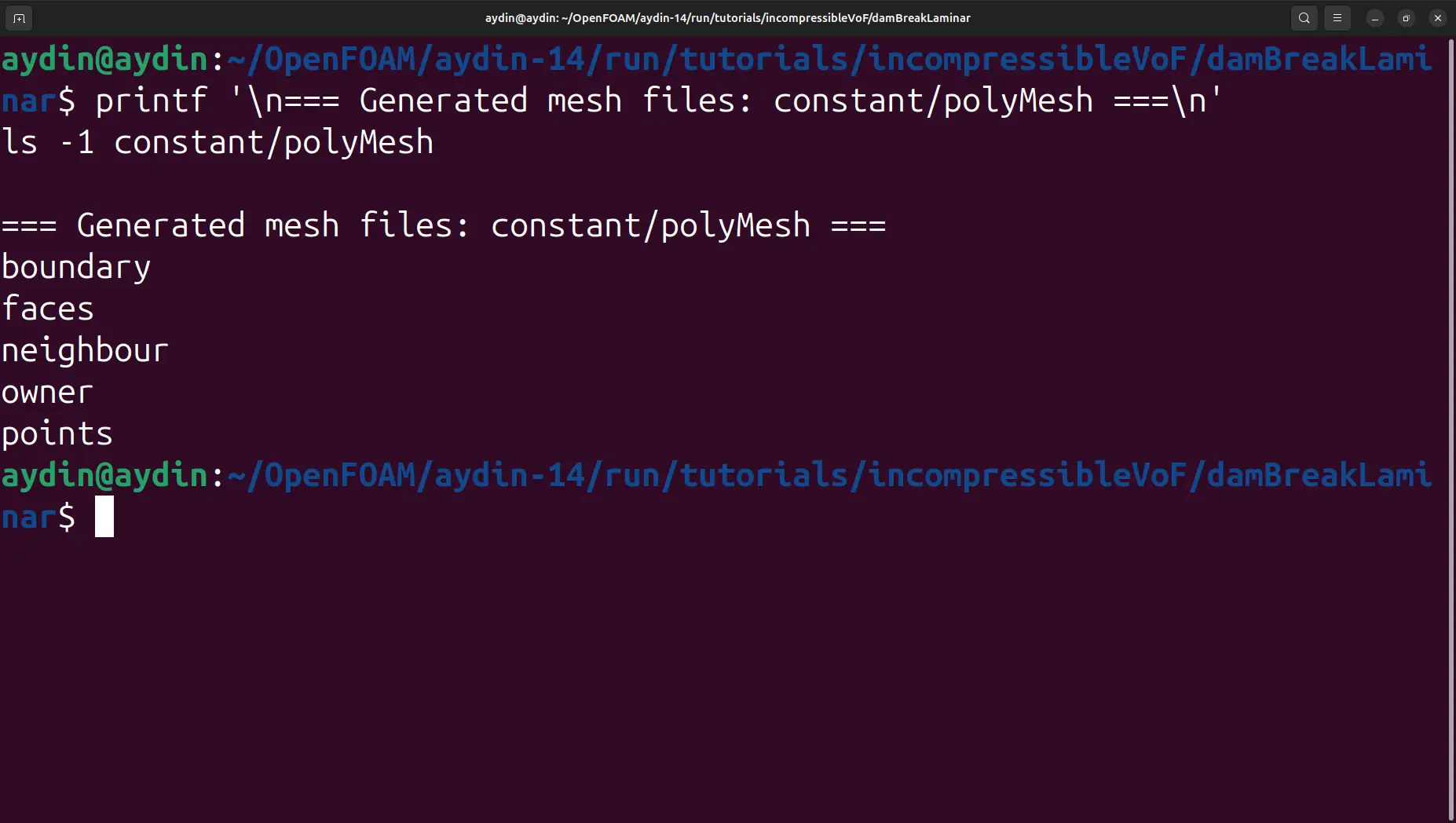
points, faces, owner,
neighbour, and boundary.
At a high level, points stores point coordinates,
faces defines cell faces, owner and
neighbour describe cell-to-face connectivity, and
boundary records the boundary-patch organisation. You do
not normally hand-edit these generated files when using
blockMesh; modify the mesh definition and regenerate the
mesh instead.
Validate the finished mesh:
checkMesh
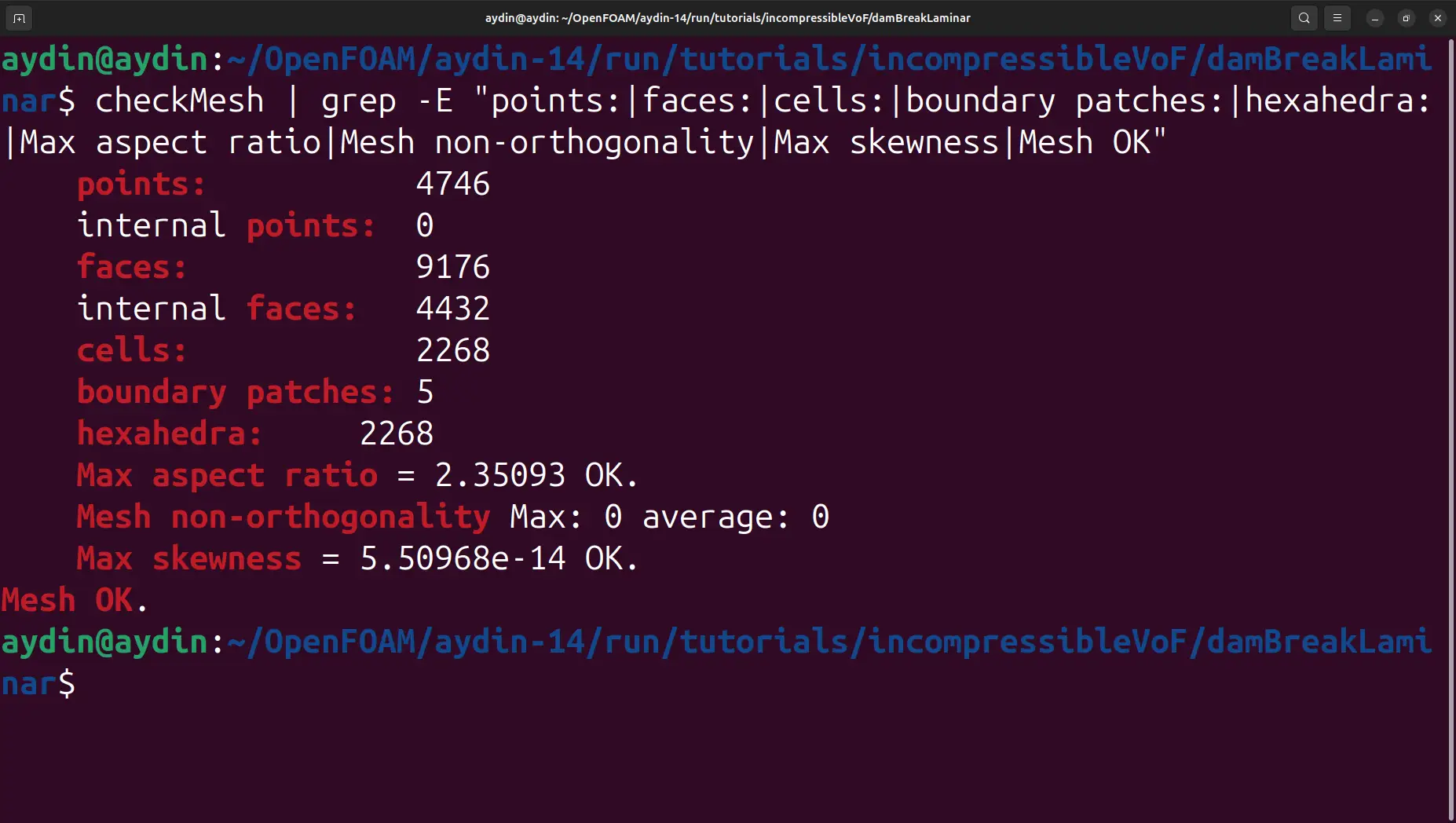
checkMesh reports 2,268 hexahedral cells and finishes with
Mesh OK. The maximum aspect ratio is 2.35093,
non-orthogonality is zero, and the reported maximum skewness is
approximately 5.51×10⁻¹⁴.
The structural relationship to remember is:
system/blockMeshDict → blockMesh →
constant/polyMesh. This distinction transfers directly
to much larger Marine CFD cases even when a different meshing workflow
is used.
6. The system Directory: Case Configuration
The system directory contains the dictionaries that
configure case preparation and execution. In the untouched
damBreakLaminar case, the files are
blockMeshDict, configDict,
controlDict, fvSchemes, and
fvSolution.
This article deliberately stops at their roles. Each of the major dictionaries deserves a separate tutorial because changing numerical schemes, time controls, solver tolerances, or coupling settings without understanding their consequences is a different task from learning case structure.
| File | Role in the Case | What to Remember Here |
|---|---|---|
system/blockMeshDict |
Defines the block-structured mesh input used by blockMesh. |
It is a mesh definition; the generated mesh is stored in constant/polyMesh. |
system/controlDict |
Controls the run, time progression, write behaviour, and solver selection used by the case. | Think of it as the top-level run-control dictionary. |
system/fvSchemes |
Defines the finite-volume discretisation schemes used for terms in the governing equations. | It tells OpenFOAM how derivatives and flux terms are discretised. |
system/fvSolution |
Contains equation-solver settings and pressure-velocity / algorithm controls. | It controls how the assembled algebraic systems are solved and coupled. |
system/configDict |
Provides additional case configuration used by the tutorial workflow. | Not every OpenFOAM case contains exactly the same supporting dictionaries. |
The important lesson is not that every future case will contain this
exact five-file list. It will not. Utilities and physical models can add
dictionaries, and different cases can organise supporting configuration
differently. The transferable idea is that system contains
the dictionaries that tell OpenFOAM applications how to prepare and run
the case.
Do not confuse “system configuration” with “physical
properties.” Numerical and execution controls generally
belong under system; time-independent model and physical
data generally belong under constant.
7. How OpenFOAM Reads a Case
Once the directory roles are clear, the workflow becomes easier to
follow. OpenFOAM applications are launched from the case directory and
locate the data they need by convention. A meshing utility reads its
mesh dictionary from system; the solver reads run and
numerical configuration from system, physical/model data
from constant, the generated mesh from
constant/polyMesh, and the current field data from the
relevant time directory.
The case must already provide compatible field files, physical properties, configuration dictionaries, and a valid mesh. Boundary patch names used by field files must correspond to patches present in the generated mesh.
The solver advances the fields through simulation time and writes
selected results into new numeric time directories. The original
0, constant, and system
directories remain the structural foundation of the case.
This is why a missing or mismatched file often produces a readable OpenFOAM error that names a directory, object, or patch. The software is not searching a hidden project database; it is reading explicit files from a known case hierarchy. For engineering work, that transparency is a major advantage because the case can be inspected, compared, version-controlled, and reproduced.
It also explains why manually copying a field or dictionary from a different tutorial can fail even when the filename looks correct. The field class, dimensions, boundary patch names, physical models, and numerical configuration must all be consistent with the case being solved.
A case is a connected system, not a collection of independent text files. The directory structure separates responsibilities, but the files still refer to the same mesh, patches, fields, models, and run configuration.
8. Run damBreakLaminar with foamRun
With the mesh generated and validated, run the OpenFOAM 14 solver from
the case directory. In OpenFOAM v14, foamRun is the main
application used to load and execute the solver module selected by the
case; the
OpenFOAM v14 standard-solvers documentation
explains this modular solver workflow.
foamRun | tee log
Using tee is convenient because the solver output remains
visible in the terminal while also being saved to a file named
log for later inspection. The beginning of the run confirms
that OpenFOAM selects the incompressibleVoF solver, constant
viscosity models, and a laminar momentum-transport model.
The solver also reports that PIMPLE is operating in transient mode with
one outer corrector and therefore in PISO mode for this setup. During
each time step, output includes the Courant numbers, the adaptive
deltaT, the current simulation time, the
alpha.water solution, pressure correction through
p_rgh, continuity information, and execution time.
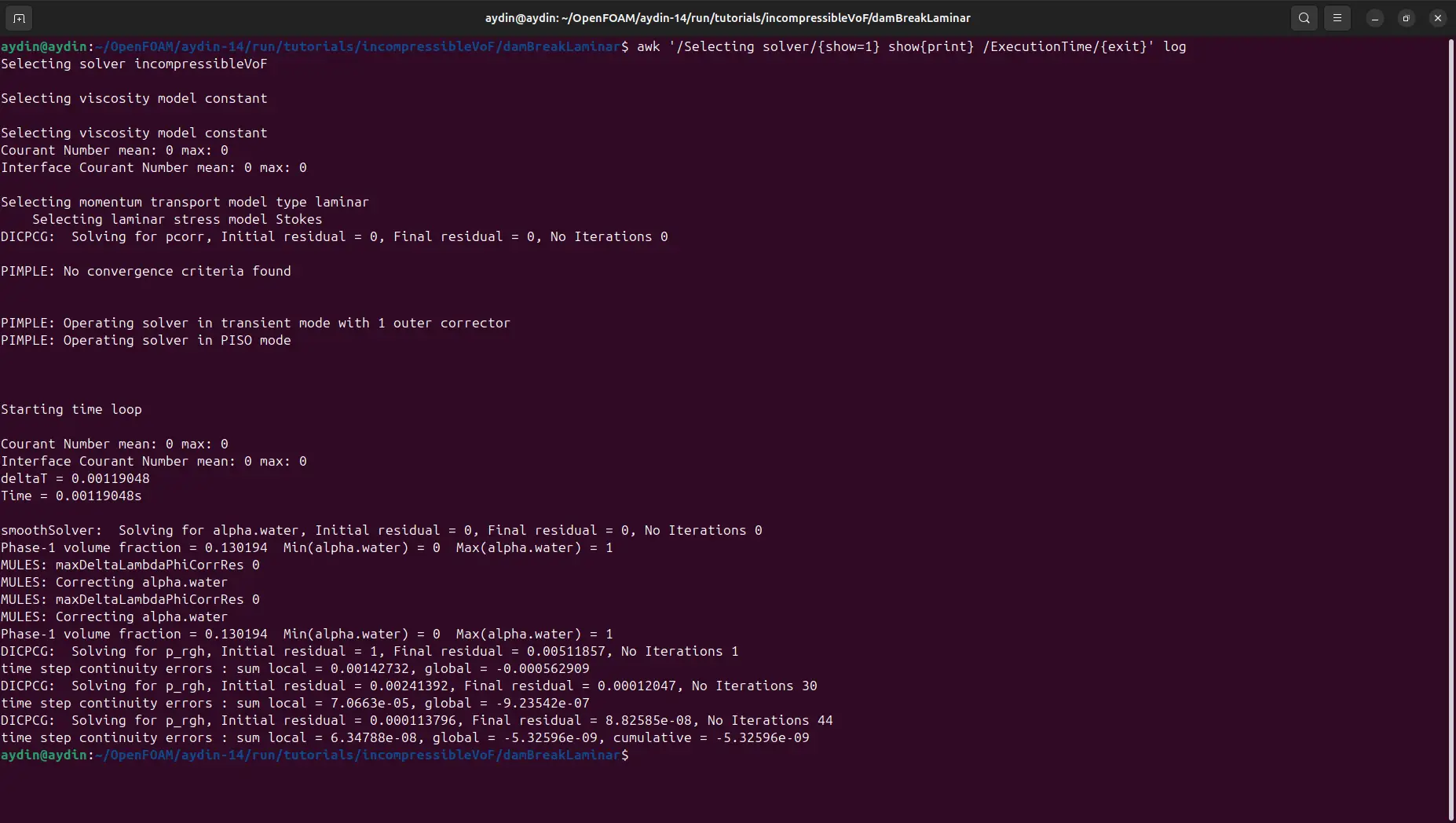
damBreakLaminar with
incompressibleVoF, advancing the transient solution for
the water volume fraction and pressure field.
For the purpose of this case-structure article, the most useful lesson is
not the detailed VOF algorithm. It is the connection between the files
we just inspected and the solver output. The alpha.water
field comes from the field setup, water and air properties come from
constant, numerical and time controls come from
system, and the equations are solved over the cells and
patches stored in constant/polyMesh.
Do not interpret this section as a complete VOF tutorial. The interface equation, MULES corrections, compression choices, and multiphase stability controls deserve their own treatment. Here they simply demonstrate that the case structure leads to a real transient multiphase calculation.
9. Time Directories and ParaView Results
A transient OpenFOAM case changes visibly after the solver writes its
results. The original 0 directory is no longer the only
numeric directory. New time directories appear according to the write
settings in the case.
List them with:
foamListTimes
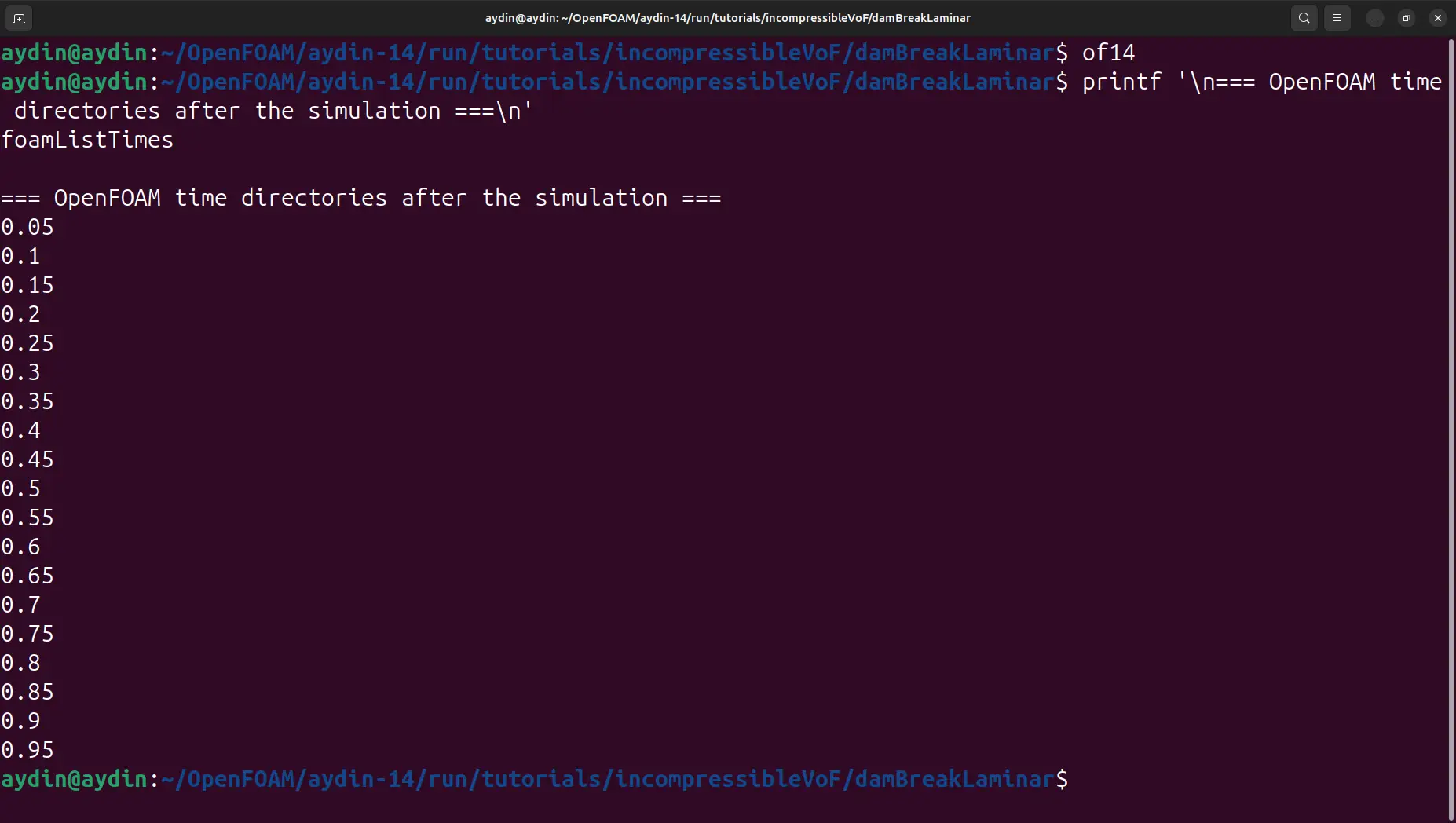
This is an important extension of the basic three-directory mental
model. The case still depends on 0,
constant, and system, but the solver adds
result directories as it advances. Those directories are why ParaView
can step through time rather than displaying only the initial state.
Open the case with:
paraFoam
In ParaView, display alpha.water and move through the time
controls. The field makes the water-air interface easy to follow and
provides a direct visual check that the solved transient data are being
read from the generated time directories. ParaView’s
official animation documentation
explains how time-varying datasets and timestep playback are handled.
alpha.water field showing the
transient dam-break flow and movement of the water-air interface.
Common Case-Structure Mistakes
Expecting an Allrun script:
this particular OpenFOAM 14 case does not include one. Run
blockMesh, checkMesh,
foamRun, and paraFoam manually.
Confusing blockMeshDict with the mesh:
system/blockMeshDict is the input definition.
constant/polyMesh is the generated mesh database used by
the solver.
Editing generated polyMesh files instead of the
source definition: for this blockMesh-based tutorial, make mesh
changes in system/blockMeshDict and regenerate the mesh.
Boundary patch names do not match: field files and the
mesh refer to the same patch names. A copied boundary condition using an
unrelated inlet or outlet patch cannot simply
be dropped into a case whose boundaries are
leftWall, rightWall,
lowerWall, and atmosphere.
Running the wrong OpenFOAM distribution in the same shell: if you use multiple installations, open a fresh terminal before activating another environment. The helper functions used in the OceanTechReview installation workflow source the selected environment into the current shell.
10. Conclusion: Reading OpenFOAM Cases with Confidence
The OpenFOAM case structure becomes much less abstract
when it is connected to a working simulation. In
damBreakLaminar, the 0 directory provides the
starting fields and boundary data, constant provides
physical/model information and the generated mesh, and
system provides the configuration used to build and run the
case.
The field file 0/U showed how OpenFOAM stores metadata,
physical dimensions, internal values, and boundary conditions. The water
property file showed why physical information belongs under
constant. The mesh workflow then made the distinction
between a definition and generated data explicit:
system/blockMeshDict → blockMesh →
constant/polyMesh.
Running checkMesh confirmed a valid 2,268-cell hexahedral
grid, and foamRun demonstrated how the directory structure
becomes an actual transient incompressibleVoF simulation.
Finally, the new time directories and ParaView animation showed where
calculated results go after the solver begins writing data.
The transferable lesson is simple: fields → physics and mesh → configuration → generated mesh → solver → time directories → post-processing. Once that sequence is familiar, opening a new OpenFOAM case becomes an exercise in reading its structure rather than guessing where important information is stored.
The next articles in this series will move deeper into the individual
dictionaries. Instead of mixing those details into this overview, we
will treat controlDict, fvSchemes, and
fvSolution separately so their entries can be explained
with the same level of care. For more hands-on engineering tutorials,
browse the OceanTechReview projects page
or the Software & Workflow Notes archive.